From click to database and back: the path of one request at TOPO
We follow a single POST, the one that creates an activity, from the Save button down to PostgreSQL and back, with every number measured in staging.
- stops on the way in
- 9
- in the API, median
- 132 ms
- response
- 201
- piece in the system
- API
- piece in the pipeline
- Production
When someone clicks Save on the new-activity dialog, the browser sends a request to our API and waits. In staging, the API answers that request in 132 ms at the median. The API measures this itself, from the start to the end of the request inside it.
This post follows that request all the way: a POST /api/process-management/activities, which creates an activity in a checklist. Every number comes from staging, our test environment, measured on 23 October 2026. Production was left alone.
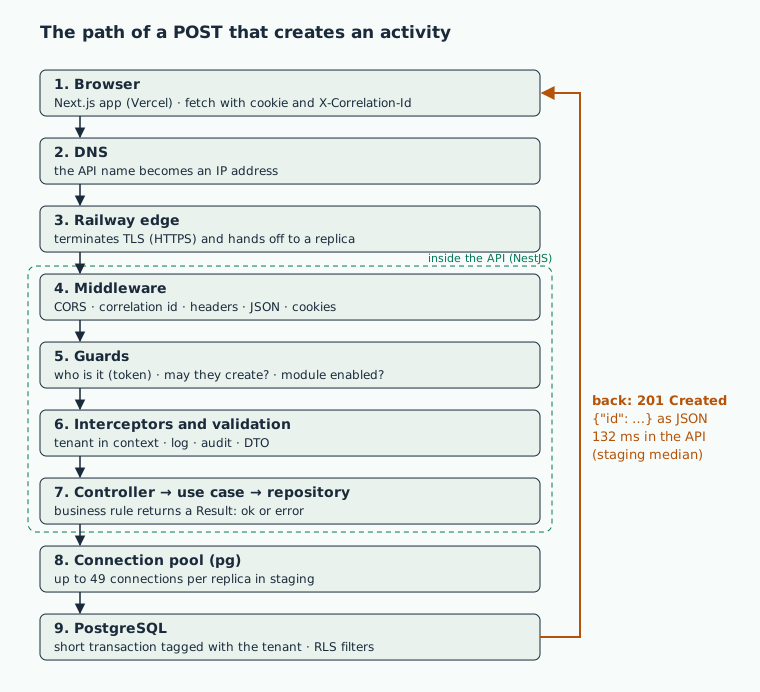
The nine stops on the way in. The orange arrow is the way back, carrying the 201 to the screen.
1. The click
The activity dialog gathers the form fields and calls createActivity, which sends a POST with a JSON body.
Every request from the app goes through one HTTP client, BaseApiClient. It adds three headers:
Content-Type: application/jsontells the API how to read the body.X-Correlation-Idis a random identifier (a UUID) created in the browser. It travels with the request into the API logs, so out of thousands of log lines we can pull out everything this one click caused.X-Tenant-Slugsays which TOPO customer is in use.
The login does not travel in a header. The access token lives in an httpOnly cookie, which the page's JavaScript cannot read. The browser attaches it on its own, because fetch is called with credentials: 'include'.
The browser talks to the API directly. The app, built with Next.js, is served by Vercel. The API, built with NestJS, runs on Railway. Each has its own address, and the request never goes through the app's server.
2. DNS and TLS
Before sending anything, the browser needs the API's IP address. DNS does that lookup, like a phone book for names. Our API's name is an alias (a CNAME record) pointing at Railway's edge, the front door of their network.
Next comes the TCP connection and, on top of it, TLS, the padlock in HTTPS. Railway's edge terminates TLS with a Let's Encrypt certificate and forwards the request to our server. The response carries an HSTS header, which tells the browser to use only HTTPS with the API from then on.
We measured this with curl: 20 back-to-back requests to one of the API's health routes, sent from a team member's computer. Times are cumulative, so each row includes the ones above it.
| Step | Min | Median | Max |
|---|---|---|---|
| DNS resolved | 3 ms | 7 ms | 217 ms |
| TCP connected | 26 ms | 34 ms | 248 ms |
| TLS ready | 61 ms | 125 ms | 283 ms |
| Response complete | 216 ms | 282 ms | 438 ms |
All four maximums come from the first request, when nothing was cached yet. In Railway's logs, each of those requests took 7 ms at the median, counted from the edge to the API and back. The rest of the 282 ms was spent crossing the network.
3. Replicas and deploys
A replica is one running copy of the API. The deploy config asks for 3 replicas in production and 1 in staging. With more than one, the edge spreads requests across them. In staging, the edge logs confirm the single replica: every request we measured landed on the same instance.
A deploy swaps replicas without dropping requests:
- The new version starts next to the old one.
- The edge only sends it traffic once the readiness route says yes. That route checks the database and Redis.
- Both versions run side by side for 30 seconds.
- The old one gets the stop signal and has 15 seconds before it is shut down. The API stops taking new requests, gives the ones in flight up to 10 seconds, and exits.
4. Inside the API, before the route code runs
NestJS passes every request through layers, always in the same order: middleware, guards, interceptors, validation, and finally the route function.
CORS. The app and the API live at different addresses. So before the POST, the browser asks the API, with an OPTIONS request, whether it accepts requests from the app. The API says yes only to TOPO's own origins, with cookies.
Middleware. These are functions every request passes through. In order:
- a header that forbids caching the response;
- HTTP metrics, when telemetry is on;
- the correlation id: the API reuses the browser's or creates one, and sends it back in the response;
- security headers, via Helmet;
- JSON body parsing;
- response compression;
- cookie parsing.
One more middleware starts a timer. When the response finishes, it writes a row to the request log table. The write is deferred until after the response, so logging never slows the caller down. That table is where the 132 ms at the top comes from.
Guards. A guard decides whether the request goes on or stops right there. On this route they check:
- who the person is: the token comes from the cookie, and the session has to be active;
- whether they may create activities (the
PROCESS_MANAGEMENT.CREATEpermission); - whether the process module is part of the customer's plan and open to them;
- whether the request's address matches the customer in the token.
No login gets a 401. Logged in without permission gets a 403.
Interceptors. An interceptor runs before and after the route function. One of them puts the customer from the token into a context that lasts for the whole request, and the database layer reads it further down. Another writes the http_request log line with the correlation id and the duration. The audit trail records who created what in a table of its own, without making the request wait for that write.
Validation. The body becomes a CreateActivityDto object, and each field has a rule. checklistId must be an integer greater than zero. The description cannot be empty. Any field the DTO does not know about is rejected. Any failure returns a 400 with the message in Portuguese, the language our users work in.
5. Controller, use case and repository
The code follows Clean Architecture, and this request touches three layers.
The controller is the route function. It reads the customer from the token, never from the body. Then it checks that the checklist exists and belongs to the module, and calls the use case. In staging, the 17 requests that stopped here got a 404 "Checklist não encontrado" (checklist not found), in 42 ms at the median.
The use case, CreateActivity, lives in the application package and knows nothing about HTTP. It:
- works out the next activity code, when the screen does not send one;
- creates the
Activityentity, which enforces the domain rules; - checks the assignees;
- checks whether the code is already taken in that checklist and company;
- asks the repository to save.
It does not throw for business errors. It returns a Result: either ok({ id }) or an error with a message.
The repository, PrismaActivityRepository, lives in the infrastructure package and talks to the database through Prisma. A Prisma error becomes a message: a duplicate unique key, for example, becomes "Registro já existe" (record already exists).
6. The connection pool and RLS
Opening a PostgreSQL connection is expensive: network, TLS and authentication. So the API keeps a pool, a set of open connections that requests borrow and hand back.
The pool is pg, plugged into Prisma through @prisma/adapter-pg. Its size comes from the database URL. When the URL does not set it, the size is the number of physical cores times 2, plus 1. In staging the URL does not set it. We ran that same function inside the API container and got 49 connections. Staging's PostgreSQL accepts up to 500. When we measured, the API was holding 2 connections, both idle. A request waits at most 10 seconds for a free connection.
The database keeps every customer's data in the same tables. What keeps them apart is RLS (Row-Level Security), a rule enforced by PostgreSQL itself. Every Prisma operation becomes a short transaction:
BEGIN;
SELECT set_config('app.current_tenant', '<customer from the token>', true);
-- the query or write at hand
COMMIT;
The true makes the setting last only for that transaction, so the connection goes back to the pool clean. If there is no customer in the context, the API refuses the operation before it reaches the database.
On the database side, every customer table has its policy turned on with FORCE, which applies even to the table owner. The rule compares the tenant_id column with the transaction's setting. Simplified, it reads:
tenant_id = current_setting('app.current_tenant')::integer
The API logs in to the database as a user with no admin rights and without the privilege that skips RLS. On an INSERT, a trigger fills tenant_id with the transaction's customer.
7. A real query
Before saving, the use case looks for an activity with the same code in the checklist and company. We ran that query in staging with EXPLAIN (ANALYZE, BUFFERS), which runs the query and shows its plan. It ran in a read-only transaction, as the API's database user and with the customer set, exactly as the API does it. Here is an excerpt of the plan, with the values replaced by parameters:
Limit (actual time=2.060..2.063 rows=1)
  ->  Sort  (Sort Key: code)
        ->  Bitmap Heap Scan on activities (rows=1)
              Filter: is_current AND tenant_id = $customer
                      AND <RLS policy> AND code ILIKE $code
              Rows Removed by Filter: 81
              ->  Bitmap Index Scan on <unique index> (rows=82)
                    Index Cond: company_id = $company AND checklist_id = $checklist
Execution Time: 2.099 ms
The index found 82 activities for that company in the checklist, and the filter kept 1. The query took 2.1 ms and touched 46 pages of 8 kB, 4 of them from outside PostgreSQL's cache. The RLS policy shows up in the filter even though nobody wrote it into the query: PostgreSQL added it on its own.
The use case's other query, which lists the checklist's activities to work out the next code, returned 574 rows in 0.97 ms, all from PostgreSQL's cache.
What if two requests arrive at the same time with the same code? Both can get past the check above. But the index is unique, so the database rejects the second write. Prisma reports error P2002, and the API answers 409.
8. The way back
The use case returns ok({ id }). The controller unwraps the Result, and NestJS turns the object into JSON:
{ "id": 123 }
The status is 201 Created, NestJS's default for POST. The route does not override it.
When the Result is an error, the controller picks the status from the error's code, or from its message when there is no code. Error bodies always have the same shape, { "success": false, "error": "<message in Portuguese>" }. An unexpected error returns a 500 with a generic message and a reference code, which is the correlation id. The technical details stay in our logs.
| Status and when | Staging, 30 days |
|---|---|
| 200 OK: a read or an update that worked | 129,593 |
| 201 Created: a create, like this activity | 4,458 |
| 204 No Content: a response with no body, like a delete that worked | 9,412 |
| 400 Bad Request: an invalid body, or a business error with no status of its own | 579 |
| 401 Unauthorized: not logged in, or the token expired | 6,929 |
| 403 Forbidden: logged in, but without the permission or the module | 967 |
| 404 Not Found: the resource does not exist for this customer | 780 |
| 409 Conflict: an activity with this code already exists | 43 |
| 422 Unprocessable Entity: the request is well formed, but the rule says no (sending for review without the required evidence) | 3 |
| 500 Internal Server Error: an unexpected error | 2 |
The counts come from staging's request log table, from 23 September to 23 October 2026, across all routes.
The time spent on the way back is already inside the numbers at the top. Across the 125 POSTs that created an activity in staging between 28 September and 19 October, the API took 132 ms at the median, and 293 ms or less for 95% of them.
9. What the screen does with the response
BaseApiClient parses the JSON. Had the response been a 204, it would return an empty object, since there is no body.
On a 201, the dialog shows "Atividade criada com sucesso" (activity created), reloads the checklist's activity list and closes. When the person picks several companies, the screen sends one POST per company, in parallel, and the notice says which ones worked and which failed.
Errors take another path:
- 401: the client tries to renew the token once and repeats the request. If that fails, the error asks the person to log in again.
- 403: becomes an authorization error.
- Anything else: becomes an error carrying the API's status and message.
The dialog shows that message in a red notice. It is the same Portuguese sentence the API wrote.
What the numbers say
From a team member's computer, a simple request took 282 ms, and only 7 ms of it was spent on Railway's side, between the edge and the API. A POST that creates an activity takes the API 132 ms at the median: guards, validation, the checking queries, the insert and the log. The query we looked at closely took 2.1 ms in the database.