A feature is only done when someone who did not write it sees every case working
How we proved, with 27 screenshots and database counts taken before and after, that the automations our customers create work.
- piece in the system
- Automations
- piece in the pipeline
- Partner's test
On the afternoon of 14 October, we triggered the job that looks for overdue activities twice in a row. Before the second trigger, the database had 7 events and 3 runs. After it, it had the same 7 and 3, and the number of notifications in the bell did not change. That result is one of the 27 screenshots we collected before showing the feature to anyone.
At TOPO, a feature is only done when someone who did not write it can see, with a screenshot, every case working. Automated tests run first, in CI. QA comes after and looks at the system as deployed to staging, the way the customer will use it.
The feature
Automations let a TOPO customer build rules in a when, if, then format. For example: when an activity is overdue, if it belongs to a certain department, then TOPO notifies a person in the bell.
The engine is our own. Every event is written to PostgreSQL before it enters a queue in Redis, so an event is not lost if the process goes down.
The script comes before the browser
Whoever does QA writes the script before opening the screen. Each step says what should happen. Next to it goes what was seen and the screenshot that proves it. Each screenshot has a time and a sentence saying what it shows.
There were 7 steps in staging, on a test customer of our own. The whole script ran in fifteen minutes.
The feature starts out switched off in staging and in production. The first step switched it on only for the test customer, with the per-customer toggle. The API confirmed it: on for that customer and off for another one.
Then came the cases:
- Rule created through the screen. The list starts empty. The editor is filled in, the confirmation warns that the rule only applies to events from now on, and the rule shows up in the list as Ligada (on).
- Overdue activity. To avoid waiting a day, we moved a test activity's due date back in the database. The previous value was kept. The job reported success.
- Notification in the bell. The test analyst saw the notification with the rule's name and the overdue text. Clicking it opened the activity, marked as overdue.
- Run recorded. The Execuções (Runs) tab shows the Sucesso (success) row, with the item and the filter that passed.
- A second trigger that does not repeat. This is the count from the start of this post. Nothing changed in the database or in the bell.
- A test that simulates without sending. The Testar (Test) button runs the rule against a real event and shows who would be notified. Nothing goes out to anyone.
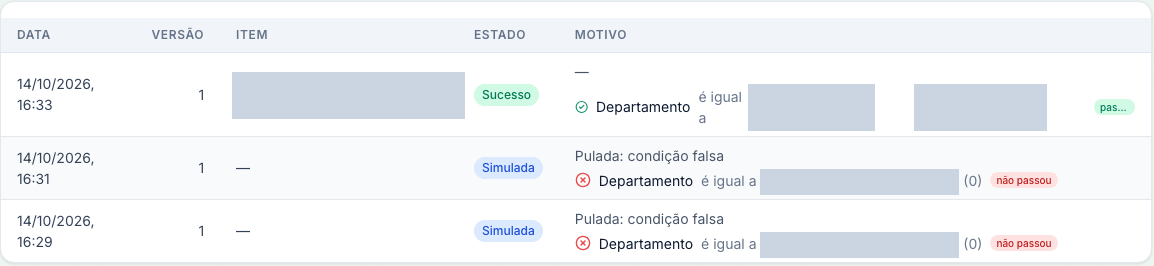
The Execuções tab shows the real run, marked Sucesso, and the two simulations made with the example.
For the last case, we counted everything before and after:
| On the test customer | Before Testar | After Testar |
|---|---|---|
| Runs | 3 | 4 |
| Simulated runs | 2 | 3 |
The only new run is a simulated one. No notification went out and no new email was recorded.
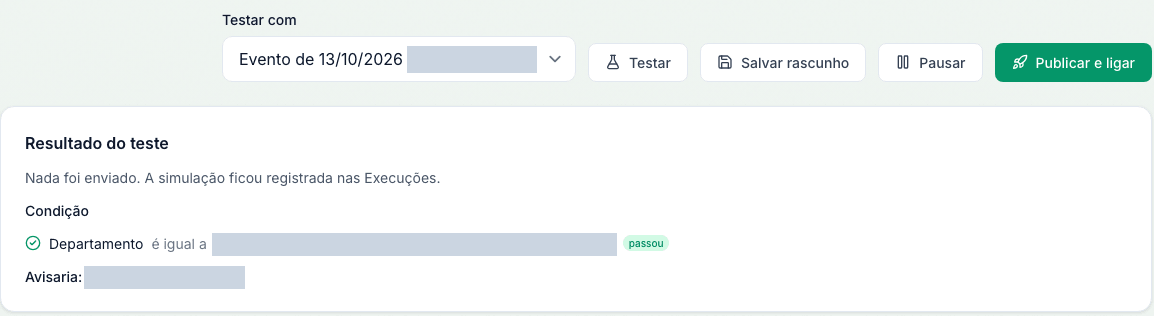
Testar on a real event says nothing was sent and shows who would be notified.
One case came up without our asking for it. Five activities were already overdue before the rule existed. They generated events, but no runs. The rule applies from now on, as the screen promises, and the database confirms it.
A partial step stays marked as partial
Of the 7 steps, 6 passed in full. The sixth passed in part, and the report says why.
We wanted a filtered run, from a rule whose filter does not pass. The test customer has only one department. And the same item does not generate two events on the same day, on purpose. So this proof came out as a simulation on a real item, not as a real run.
We also wanted to see the exact response another customer gets when it asks for a rule that is not its own. The other customer's user was blocked, and so was the analyst without permission. But that user was stopped at the permission check, before reaching the rule. The exact response for that case was not reproduced.
This way, whoever reads the report knows what is proven and what is still left to prove.
In the last step, we undid what we had forced. The due date and the activation date went back to their previous values, checked in the database. The rule was left paused, ready for the next test.
Two defects only the screen showed
QA found two defects. In both, the database was right. The error was in what the person sees.
The first showed up on a new rule. Testar saved the draft, opened the rule's page, and the result disappeared. The simulated run was in the database. The problem was the change of address: on save, the new rule gets a page of its own, the editor reloads, and the result kept in the form was lost. The fix runs the simulation before the address changes and hands the result to the new page through the React Query cache. A new automated test repeats that path.
The second was visual. On the Execuções tab, the "passou" (passed) badge showed up cut off as "pas...". You can see it in the first screenshot, to the right of the Sucesso row. The row now wraps like it does in the other lists, and the badge does not shrink.
The fix for both was written 13 minutes after QA ended. The same afternoon, it was deployed to staging, before anyone tested the feature. In production, the feature stays off by default.